Aesthetic Rooftop Girl LockScreen Photo Editing Prompt 2026
Featured image for: Aesthetic Rooftop Girl LockScreen Photo Editing Prompt 2026
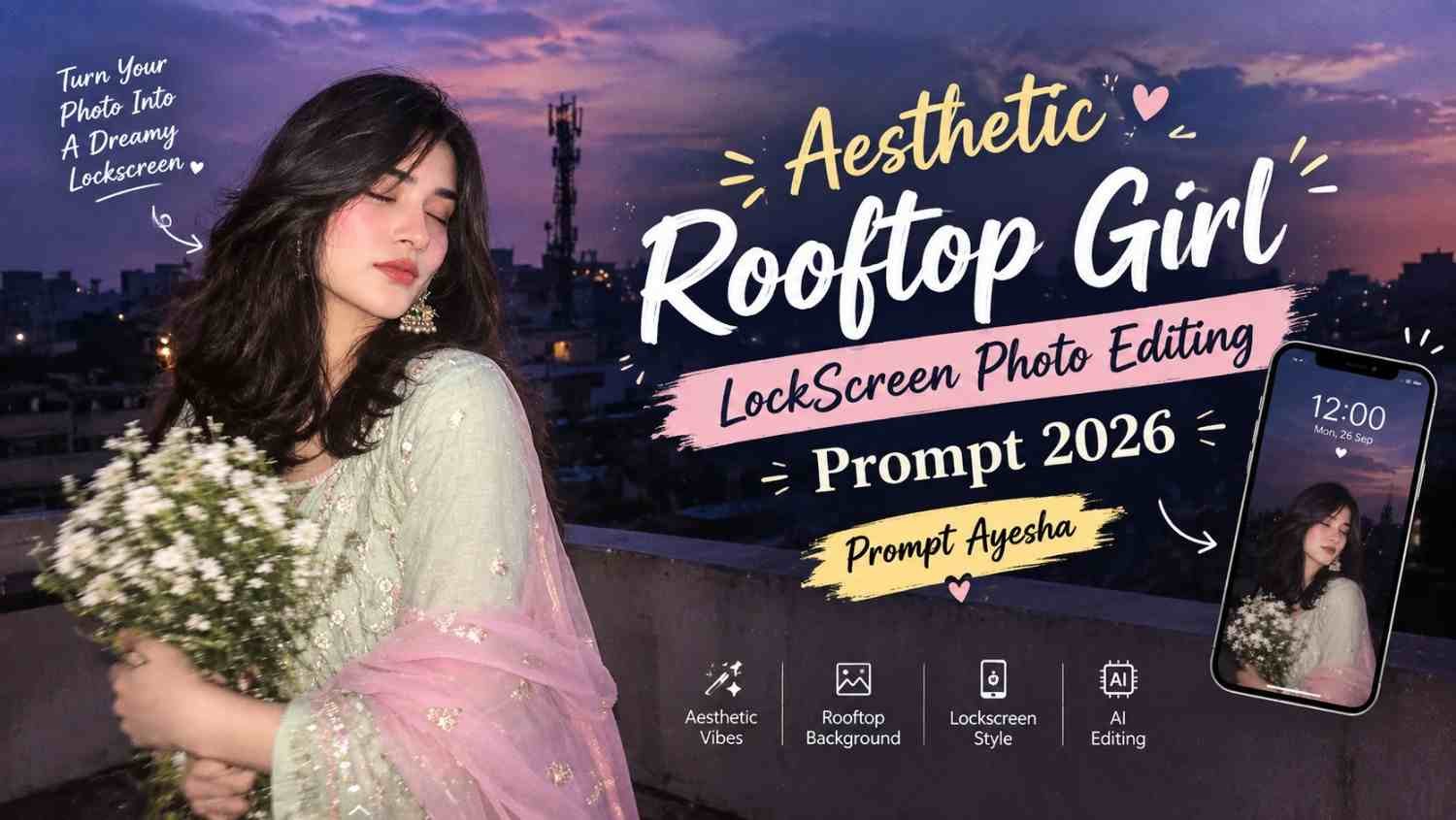
Want to turn your portrait into a dreamy and realistic phone lockscreen wallpaper? This Gemini prompt is designed around a candid rooftop scene with a dusky lavender-purple sky, direct flash photography and an early-2000s digital-camera aesthetic.
The concept uses a reference image to maintain the same facial features, hairstyle and overall appearance while placing the subject in a completely different visual setting. The result is intended to look like a spontaneous rooftop photograph captured during blue hour rather than a heavily edited studio image.
The combination of a pastel mint-green Anarkali, sheer baby-pink dupatta, white flowers and a dark urban background gives the photo a soft yet nostalgic appearance.
Rooftop Girl LockScreen Photo Concept
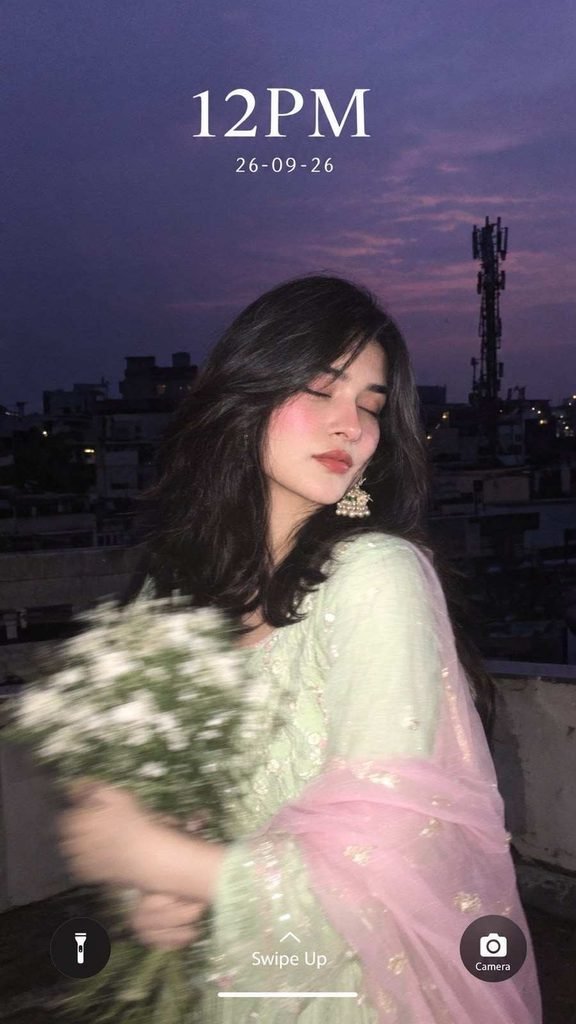
The main focus of this photo is a young woman standing on an urban rooftop during blue hour. Her body is slightly turned away from the camera while her eyes are softly closed, creating a relaxed and candid expression.
She holds a bouquet of small white flowers with both hands. The hands and flowers have noticeable motion blur, which makes the image feel like it was captured naturally while she was moving rather than posing perfectly for the camera.
Her outfit consists of a pastel mint-green traditional Anarkali with subtle flowing details. A sheer baby-pink dupatta is loosely draped around her shoulders and arms, adding movement and softness to the composition.
Statement earrings and long flowing hair complete the look.
Creating the Early-2000s Camera Look
One of the most distinctive elements of this concept is the photography style. Instead of a perfectly sharp modern smartphone photograph, the image should have characteristics associated with early digital cameras.
The direct flash should illuminate the woman strongly while the surrounding rooftop remains relatively dark. This creates a noticeable contrast between the subject and the background.
A small amount of grain, soft focus and flash glow can further enhance the nostalgic appearance. The image should still retain realistic skin texture and natural facial details rather than appearing overly smooth or artificial.
Exact Photo Editing Prompt
Use the following prompt with your reference image:
Create an ultra-realistic candid rooftop closeup portrait of the woman in the reference image as a lockscreen wallpaper, at blue hour, with a dusky lavender-purple sky. She stands on a rooftop, body slightly turned away, eyes softly closed, both arms holding a bouquet of small white flowers, with heavy motion blur on hands and flowers. She wears a pastel mint-green traditional Anarkali, subtle flowing details, sheer baby-pink dupatta draped loosely around her shoulders and arms, statement earrings, long hair flowing. Preserve her exact facial features, skin texture, warm blush and glossy lips. Background: urban rooftop, buildings, railings and mobile tower silhouette. Direct flash brightly lights her while the background stays dark. Add early-2000s digital-camera aesthetics, soft focus, flash glow, mild grain and candid look. Add lockscreen text: “12PM”, “26-09-26”, “Swipe Up”, “Camera”.
How to Get a More Realistic Result
For this type of AI prompt, the reference image is particularly important. Choose a clear photograph where the face is visible and the hairstyle can be easily recognized.
The prompt specifically asks to preserve facial features, skin texture and other identifying visual details. However, the final result can still vary depending on the image model and the quality of the reference image.
For the rooftop environment, keeping the background slightly darker helps the flash-lit subject stand out. The lavender-purple sky should remain visible without becoming excessively bright.
The motion blur should primarily affect the hands and bouquet. Keeping the face relatively clear helps preserve the natural portrait appearance.
Why the LockScreen Style Works
A vertical portrait is naturally suited to a phone lockscreen because it fills most of the mobile display. Leaving enough negative space around the upper portion of the composition also allows the lockscreen time and date to remain visible.
In this concept, the “12PM” and “26-09-26” text create a nostalgic phone-lockscreen appearance. The “Swipe Up” and “Camera” elements complete the visual illusion of a photographed smartphone lockscreen.
The darker rooftop and purple sky also provide enough contrast for the white lockscreen text to remain readable.
Outfit and Background Details
The pastel mint-green Anarkali gives the image a soft traditional appearance without overpowering the background. The baby-pink dupatta adds another pastel element and introduces movement around the subject.
Behind her, the urban rooftop should remain realistic and relatively dark. Buildings, railings and a mobile tower silhouette help establish the location without distracting from the main subject.
The combination of traditional clothing and an urban rooftop creates a contrast between the subject and environment, while the blue-hour lighting ties everything together.
Using ChatGPT for Similar Photo Edits
A ChatGPT prompt can also be structured around the same type of visual instructions when creating or refining an image. The important part is to describe the subject, clothing, lighting, environment, camera style and composition clearly.
Instead of simply asking for a “beautiful rooftop photo,” detailed instructions such as the desired flash effect, motion blur, background darkness and lockscreen elements give the image model a much clearer visual direction.
You can also experiment with different dates, lockscreen layouts or background locations while keeping the overall photographic aesthetic consistent.
Tips for the Best Lockscreen Wallpaper
Before generating the image, keep these points in mind:
- Use a high-quality reference photograph.
- Make sure the face is clearly visible.
- Use a vertical composition for mobile wallpaper.
- Keep the subject slightly below the upper text area.
- Maintain realistic skin texture.
- Keep the direct flash effect visible but natural.
- Avoid excessive blur on the face.
- Keep the bouquet and hands as the primary areas of motion blur.
- Maintain the dark urban rooftop background.
- Keep the lockscreen text clean and readable.
These details can help maintain the candid-camera feeling instead of making the final image look like a conventional fashion photoshoot.
Final Thoughts
This rooftop lockscreen concept combines a nostalgic digital-camera aesthetic with traditional clothing, soft pastel colors and an urban blue-hour environment. The direct flash, subtle grain, motion blur and dark background help create the feeling of a spontaneous photograph captured on an old digital camera.
If you enjoy experimenting with creative photo-editing ideas, Prompt Ayesha offers more prompt-based concepts that can be adapted for different outfits, locations, lighting styles and social-media visuals.
The key to this particular style is keeping the subject realistic while allowing the background, lighting and motion effects to create the nostalgic atmosphere.
Complete Step-by-Step Editing Workflow
- Copy the prompt or preset code using the dedicated copy button above.
- Open your editing tool: Use your preferred AI image or video editing tool.
- Personalize the variables: Adjust the background, clothing, lighting, pose or mood according to your requirements.
- Generate & refine: Generate the image and make additional changes if required.
- Export: Save the final high-quality image for your social media platform.
Prompt Ayesha
The Prompt Ayesha curates practical AI prompts, photo-editing resources, video-editing ideas, and creator-focused tutorials designed to help readers create and edit digital content.