
Prompt Ayesha Bridal Photo Editing Prompt
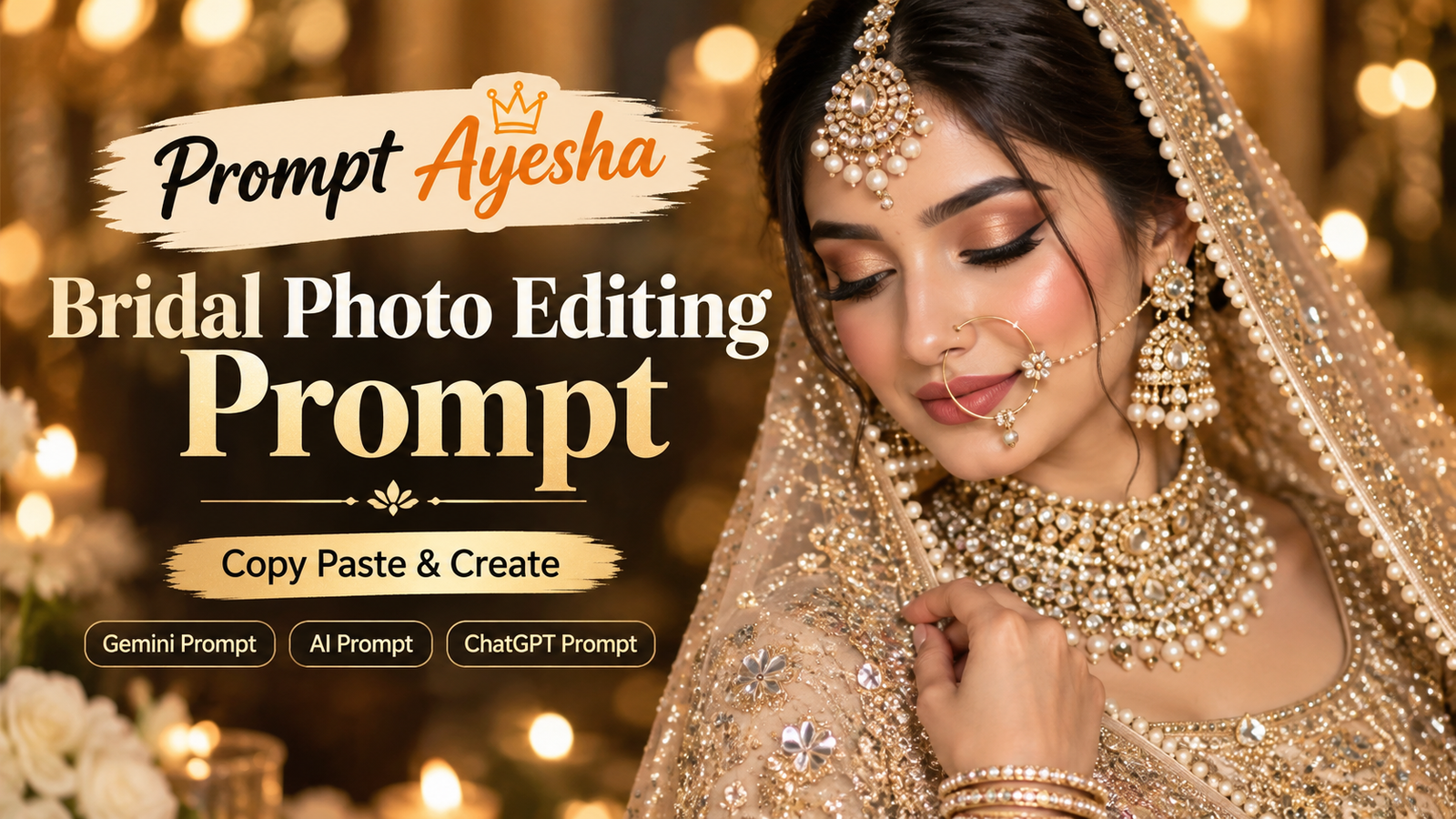
Featured image for: Prompt Ayesha Bridal Photo Editing Prompt
Want to create a luxurious, cinematic bridal portrait with an elegant Indian wedding look? This bridal photo editing prompt is designed to create a highly detailed South Asian bride wearing a champagne-gold and ivory bridal lehenga, traditional jewelry, a sparkling dupatta, and soft glam makeup.
The overall concept focuses on a premium Indian bridal editorial style with warm golden lighting, realistic skin texture, detailed embroidery, and a dreamy wedding atmosphere. If you’re looking for a gemini prompt for creating a sophisticated bridal image, the following prompt can help you achieve this kind of visual direction.
The prompt can be used with an AI image-generation tool where you can describe the outfit, jewelry, makeup, pose, lighting, and photography style in detail. For the best result, use a clear reference image when your chosen tool supports identity or face-reference features.
Bridal Photo Editing Prompt
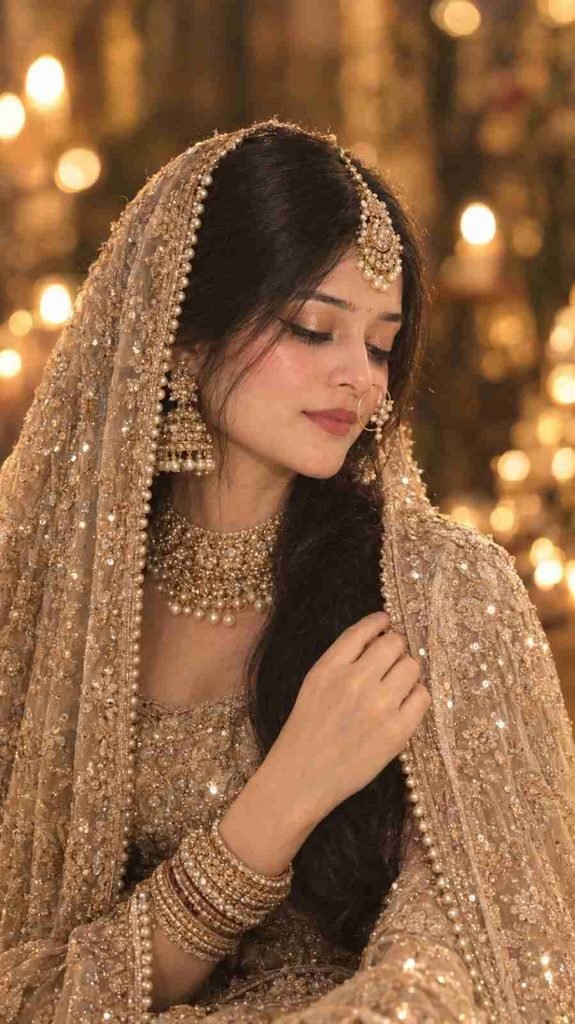
Create an ultra-realistic cinematic close-up portrait of a beautiful South Asian bride wearing an elegant champagne-gold and ivory heavily embellished bridal lehenga. She is draped in a luxurious sheer glittering dupatta over her head and shoulder, decorated with intricate sequin, crystal, and pearl embroidery with a delicate pearl border. She is wearing luxurious traditional Indian bridal jewelry, including a large pearl-and-gold maang tikka, oversized intricate jhumka earrings, a heavily detailed layered gold-and-pearl choker necklace, and a delicate large gold nath with pearl embellishments. Add elegant stacked bridal bangles. Her makeup is soft glam bridal makeup with glowing dewy skin, warm peach-pink blush, champagne-gold shimmer eyeshadow, dramatic black winged eyeliner, long natural lashes, neatly defined eyebrows, and muted rose-red lipstick. Her dark hair is sleek and elegantly styled beneath the veil, with a few soft strands naturally framing her face. Pose: intimate close-up three-quarter portrait, face slightly turned downward and toward the camera, eyes gently closed, serene and graceful expression, one hand delicately holding the edge of the sparkling dupatta near her shoulder. Lighting: warm golden cinematic lighting, soft diffused glow across the face, subtle candle-like bokeh lights in the background, dreamy luxurious wedding atmosphere, beautiful highlights reflecting from the jewelry and sequins, shallow depth of field. Style: photorealistic high-end Indian bridal editorial photography, natural facial features, realistic skin texture, highly detailed jewelry and embroidery, realistic fabric texture, cinematic composition, 85mm portrait lens, creamy background bokeh, professional studio photography, soft warm tones, ultra-detailed, 8K quality. No text, no captions, no watermark, no logos, no UI elements.
What Makes This Bridal Prompt Special?
The prompt combines several elements that are important for creating a premium bridal portrait. Instead of focusing only on the outfit, it describes the complete visual composition, including jewelry, makeup, hairstyle, pose, lighting, background, and photography style.
The champagne-gold and ivory color combination gives the bride a sophisticated appearance while the sequins, crystals, pearls, and embroidery add richness to the outfit. The sheer dupatta also creates a soft layered effect around the face and shoulders.
Another important element is the jewelry. The maang tikka, jhumkas, choker, nath, and bangles are described individually so the generated image can capture the traditional bridal aesthetic with greater detail.
The lighting description also plays an important role. Warm golden illumination combined with candle-like bokeh helps create an intimate wedding atmosphere instead of a flat studio-style image.
Tips for Getting a More Realistic Bridal Result
When using an ai prompt for image creation, detailed descriptions can help establish the overall visual direction. However, the final result can still vary depending on the image-generation model, reference image, and settings being used.
For a more natural-looking portrait, use a clear and well-lit reference photograph when your AI tool supports image references. Avoid heavily filtered or extremely low-resolution reference images because facial details may not transfer as naturally.
You can also experiment with different aspect ratios depending on where you want to use the image. A portrait-oriented format can work well for Instagram posts, Pinterest graphics, profile-style portraits, and mobile wallpapers.
For a close-up bridal composition, keeping the face as the main visual focus can help preserve the editorial photography effect. The jewelry, veil, and embroidery should complement the face rather than overpower it.
Why Cinematic Bridal Portraits Look So Premium
Cinematic bridal photography is not only about adding more jewelry or making the outfit more detailed. The combination of lighting, depth of field, composition, fabric texture, skin details, and background atmosphere creates the premium appearance.
In this concept, the soft golden light highlights the bride’s face while the background remains intentionally blurred. This creates separation between the subject and the environment.
The shallow depth of field also produces creamy bokeh around the bride, giving the portrait the appearance of professional photography captured with a portrait lens.
The realistic skin texture is equally important. An overly smooth face can make an AI-generated image look artificial, while subtle natural skin details can make the final portrait feel more photographic.
How to Use This Prompt
You can copy the complete prompt above and paste it into your preferred AI image-generation platform. If the platform allows you to upload a reference image, you can add one according to its available image-reference features.
After generating the first result, you can experiment with the image settings while keeping the main prompt unchanged. Try different portrait dimensions and reference-image strengths to see how they affect the final composition.
If the first generation does not produce the desired jewelry or outfit details, generating another variation can often produce a closer result. AI-generated images may interpret specific details differently from one generation to another.
If you’re using this concept with ChatGPT, keeping the visual instructions together rather than adding unrelated descriptions can help maintain a consistent creative direction.
Final Thoughts
A beautiful bridal portrait depends on the balance between traditional styling and modern cinematic photography. This concept combines an elegant champagne-gold bridal outfit, detailed Indian jewelry, glowing makeup, a sparkling veil, warm lighting, and a graceful pose to create a luxurious wedding-inspired portrait.
Whether you’re creating a personal bridal-style image, experimenting with AI photography, or exploring new visual ideas for social media, this prompt provides a detailed starting point. Prompt Ayesha brings together creative image-generation ideas that can help you explore different photography styles and concepts.
Remember that AI-generated results can vary depending on the platform and reference image you use. Experiment with different generations while keeping the core visual concept consistent.
Frequently Asked Questions
Q. Can I use this bridal prompt with different AI image generators?
Yes. The prompt is written as a detailed visual description and can be adapted to different AI image-generation platforms. The exact output may vary between tools.
Q. Can I use a reference photo with this prompt?
If your selected AI platform supports image references, you can use a suitable reference image. Follow the platform’s own rules regarding uploaded images and identity references.
Q. How can I make the bridal image look more realistic?
Use a high-quality reference image when supported, avoid excessive facial filters, and keep the lighting and photography instructions detailed. Multiple generations may also help you find a more natural result.
Q. What type of image is this prompt designed to create?
It is designed for a close-up, three-quarter South Asian bridal portrait with cinematic lighting, traditional Indian bridal jewelry, an embellished lehenga, and a luxurious wedding atmosphere.
Q. Can I use this prompt for social media?
Yes. You can generate a suitable portrait-oriented version for platforms such as Instagram, Pinterest, Facebook, or other visual-content platforms, depending on the platform’s requirements.
Complete Step-by-Step Editing Workflow
- Copy the prompt or preset code using the dedicated copy button above.
- Open your editing tool: Use your preferred AI image or video editing tool.
- Personalize the variables: Adjust the background, clothing, lighting, pose or mood according to your requirements.
- Generate & refine: Generate the image and make additional changes if required.
- Export: Save the final high-quality image for your social media platform.
Prompt Ayesha
The Prompt Ayesha curates practical AI prompts, photo-editing resources, video-editing ideas, and creator-focused tutorials designed to help readers create and edit digital content.